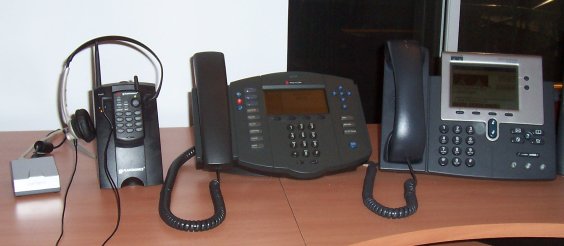
Left to right: Sipura SPA-1001 ATA, Plantronics CT10 test phone on ATA, Polycom SoundPoint IP 500, Cisco 7940
This page contains reviews for VoIP phones that I have used. These reviews reflect my personal preferences as well as features I expect most users to be interested in.
This is not a very good phone. I am really not impressed.
The user interface is terrible. An Example of a place where it is lacking is the Callers button, which is supposed to give you a list of recent incoming calls. I couldn't figure out how it worked and gave up. I figured it was probably counted among all the other buttons (e.g. one of Conference or Transfer, not sure which) that don't work because the software does not support them yet. I actually had to read the docs to find out that I have to lift the receiver or activate hands free mode before the button will work. This is completely unintuitive and unnecesary. Also the buttons are way too large, I cannot dial fast with this phone, at least not with one hand. The receiver is uncomfortable, aggravatingly so after just minutes of use. The ringer sounds like a ringback tone played over a speakerphone. Finally, they really should have spent the small extra amount of money on a bitmapped LCD display that can show more than just 7 segment numbers.
The web interface doesn't work well. It's a wonder I managed to configure it initially. I don't know how I did it. When I wanted to reconfigure it a few weeks later I could no longer reach the web interface (attempts to contact it using my web browser result in timeouts). It works shortly after I reboot the phone but not for very long. When I did get to use it I couldn't figure out how to authenticate to it. I entered a password but based on the response it wasn't clear to me whether it had worked or the password was incorrect or else my password submission had somehow been ignored.
The audio quality is fine. No problems there.
This is not a very good ATA. I am really not impressed.
The audio quality is very low. With a Nortel Harmony connected it kind of worked, but with the Plantronics cordless headset (shown above) it was basically unusable. I could not hear the other party. I should mention that one of the problems with the Plantronics phone doesn't feature fantastic audio quality to begin with but that's one of the reasons I test with it. It is certainly possible for an FXS port to drive it adequately (a DMS does, over an approximately 900m 24 gauge loop) and this thing definately does not. Surprisingly however, though it is unusable for voice, fax works great, unlike with the ATA I had before that (Azacall 200).
I don't understand why it has a pushbutton on it. There's no local control function which makes sense to have on an ATA as far as I'm concerned. It's useless.
The configuration web interface suffers from the same problems as the BudgeTone web interface because it's the same one.
Cisco's phones are very good. The audio quality is great, the handset is comfortable, the display is large and user friendly, the buttons are well located and comfortable, and the menus are well organized. The illuminated headest, mute, and speakerphone buttons are especially nice. The advanced features on this phone like call forward and transfer all work well.
Cisco appears to have a greater commitment to the SCCP software than to the SIP software for these phones. The SIP software seems a little less polished. The fact that Cisco seems to be committed to their proprietary protocol more firmly than to the industry standard is a slight concern for me. Then again Cisco does this all the time (e.g. HSRP vs. VRRP).
It is very difficult to upgrade the software on this phone unless the existing software on the phone is quite recent. Good thing I only have to do it once per phone.
Personally I like my keyboards horizontal but the Cisco phone is designed to be used at a nearly vertical angle though it is adjustable. I'm still comfortable up to a certain angle (you couldn't have it flat anyway because you wouldn't be able to read the display from a sitting position) but as a small technical detail, my power cord's connector is squished if I flatten it too much. Cisco really expects you to use PoE. I wish I had that at home (it would allow me to put phones with backup power all over the place without having to put UPSes all over the place) but the PoE injector or ethernet switch products are a bit ridiculous for home or [very] small office use.
Unfortunately the Cisco phone is a bit pricy.
This is a fantastic phone. It is the best value of all of the phones I tested.
At the risk of repeating this from the Cisco review, the audio quality is great (I hope so, it's a Polycom!), the handset is comfortable, the display and menus are user friendly. The advance features on this phone also work well. There are just a few too many buttons (I find myself hunting for "Call lists" or "Redial") and I the speakerphone, mute, and handset buttons are a little bit sandwiched between the line buttons and the handset, but it's really not bad. It's far, far better than the Grandstream. A small detail: when I press "Do Not Disturb", they probably should not have made two icons flash constantly on the screen because... well... that disturbs me.
The Polycom is the only phone that doesn't carry stupid baggage from the POTS world in the sense that you can dial it like a cell phone: enter and edit the number to dial and then when you're done, GO. Why does every other phone play DTMF tones when dialing a call? Hello, my SIP signalling packets do not contain touch tone music! When you are done dialing there are in fact at least five ways to place the call (hit a line button, hit speakerphone, hit headset, use the "Dial" softkey or pick up the receiver) and your call is connected right away, assuming the network is fast.
Configuring the phone is a little bit complex. The full configuration file (admitedly including the parts you don't play with) is over 128KB. You definately don't write that from scratch. You don't even write the per phone configuration from scratch. It's only 28 lines but 8KB and looks as close to line noise as you can get with only alphanumeric characters and standard XML syntax. Also the documentation on setting up the configuration and software download server is lacking. I discovered by packet sniffing that it's supposed to be FTP, not TFTP. My embedded system router and DHCP server did not run an FTP server. Now it does, but I didn't really want to. The phone also wants to write back its config changes so you lose functionality if you make the FTP server read only.
The Polycom comes with a really funky LAN patch cord with a parasite type attachment for the power adaptor. That's cool, there's only one wire coming out from behind the phone even though I'm not using PoE.
This phone takes a really long time to boot.
This seems like a good ATA. It's a small box, looks like a lightweight but robust little black (silver!) box. When I unpacked it, I decided to bring it up as fast as I could to see how easy it would be. I had never touched a Sipura device before. I don't think it took me more than two minutes:
Then I tested with the Plantronics phone and found it totally reasonable.
I don't have anything else to say about this device for now. Unlike the other ones I've only had it plugged in for a few hours.